How to build a 3D website with Claude Code
By Ruturaj Jena, Brand Motion Studios · Updated
To build a 3D website with Claude Code, choose Three.js or React Three Fiber, then brief the agent in stages: the scene first, then the scroll, then the page, then the polish. Check each stage in the browser before the next, and hold the result to two limits: the page loads its main content within 2.5 seconds, and the scene stays at a few hundred draw calls.
Claude Code is Anthropic’s coding agent. It reads your project, writes and edits files and runs commands, so it can build a real-time 3D site from an empty folder. This is the method we use for the designs in our 3D website design collection. It works the same way in Cursor, Antigravity and Windsurf.
The short answer: seven steps
| Step | What you do |
|---|---|
| 1. Choose the stack | React Three Fiber for a Next.js or React site; plain Three.js for a single page with no build step. |
| 2. Write the brief in stages | One stage per session: the scene, the scroll, the page, the polish. Not one giant prompt. |
| 3. Build the scene first | Get one object lit and moving before any page layout exists. |
| 4. Let scroll drive the camera | One timeline from top to bottom, so the page plays forwards and backwards. |
| 5. Keep it fast | Hold the page to the Core Web Vitals and the scene to a few hundred draw calls. |
| 6. Add the fallbacks | Reduced motion, no WebGL, a lost graphics context, and phones. |
| 7. Check it and ship it | A real phone, a production build, then deploy. |
What you need before you start
- Node.js, the current LTS release, for anything with a build step.
- Claude Code, or another coding agent that can edit files and run commands.
- A browser with its developer tools open, and a real phone for the last step.
- A clear idea of the scene. One object, one camera move and one mood is enough. A reference image helps more than a paragraph of adjectives.
You do not need to have written Three.js before. You do need its vocabulary, because the agent works from your words: a mesh is a shape with a material, a draw call is one thing sent to the graphics card, and the pixel ratio is how many screen pixels each CSS pixel covers.
1. Choose the stack
React Three Fiberif the site is React or Next.js. Its own documentation calls it “a React renderer for three.js” (React Three Fiber, Introduction): the scene is written as components, so a configurator, a cart or a form shares state with the 3D like any other part of the page.
Plain Three.js for a single page with no framework. It needs no build step, runs from a folder and can be hosted anywhere. The Three.js documentation is the reference the agent and you will both use.
One HTML file if you only need a 3D hero or a section inside a site you already have, including a Webflow or Framer page.
Tell the agent the stack and the versions in the first message. Left to choose, it may mix patterns from different versions of a library.
2. Write the brief in stages
One long prompt for the whole site is the most common mistake. The agent builds everything at once, nothing has been looked at, and one wrong assumption early on runs through all of it. Anthropic’s own advice is to write a specific prompt and to give the agent a way to check its work (Claude Code best practices). A staged brief does both.
The stages we use:
- Foundation. The project, the stack, an empty canvas that fills the screen and resizes.
- The scene. The object, its materials and the lighting, standing still.
- Motion. The camera path and what scroll does at each chapter.
- The page. Real HTML headings, copy and buttons over the canvas.
- Performance and fallbacks. The limits in step 5 and the cases in step 6.
- Polish. Loading, transitions, sound if any, and the phone layout.
End every stage with something you can see: “when this stage is done, the ring sits centre screen under a warm key light and turns slowly”. Put the rules that never change (the stack, the file layout, the performance limits) in the project’s CLAUDE.md file, and keep it short, so every session starts from the same facts.
3. Build the scene first
Get one object on screen, lit and moving, before any page layout exists. Everything else depends on the scene looking right, and it is the part the agent cannot judge for itself.
Describe it the way you would brief a photographer: what the object is made of, where the main light comes from, what colour the shadows are, how close the camera is. Then look at the result and correct it in the same terms: “the key light is too flat, move it higher and to the left” gets a better answer than “make it look premium”.
Where you can, have the model built in code from simple shapes and shaders. A model made this way has no file to download and no licence to check, and its size on the wire is a few kilobytes of JavaScript.
4. Let scroll drive the camera
A cinematic 3D site is usually one camera move tied to the scrollbar. Ask for one timeline that runs from the top of the page to the bottom, with the scroll position as its playhead, so the page plays forwards as you scroll down and backwards as you scroll up. GSAP’s ScrollTrigger is the common tool: its scrub setting links an animation’s progress directly to the scrollbar.
Ask for one clock, not many. A page with a separate trigger for every element drifts out of step and stutters; one timeline that everything reads from stays together.
5. Keep it fast
Give the agent numbers, not “make it fast”. These are the published limits worth writing into the brief:
| Measure | Limit | Source |
|---|---|---|
| Largest Contentful Paint | Within 2.5 seconds of the page starting to load | web.dev, Google |
| Interaction to Next Paint | 200 milliseconds or less | web.dev, Google |
| Where to measure both | At the 75th percentile of page loads, on phones and on desktops | web.dev, Google |
| Draw calls in the scene | No more than 1,000 at the very most, ideally a few hundred or fewer | Poimandres |
On draw calls, the React Three Fiber documentation is direct: “Each mesh is a draw call, you should be mindful of how many of these you employ: no more than 1000 as the very maximum, and optimally a few hundred or less” (Scaling performance). Its fix is instancing: drawing many copies of one object in a single call.
What we also ask for, from our own builds:
- Cap the pixel ratio on dense screens. A phone that reports 3 draws nine times the pixels of a ratio of 1. MDN’s WebGL best practices covers sizing a canvas for high-density displays.
- Paint the heading and the first line of copy as plain HTML before the 3D loads, so the page is readable while the scene starts.
- Stop rendering when the canvas is off screen or the tab is hidden.
- Lower the particle counts and turn off the heavier effects on small screens.
6. Add the fallbacks
An agent builds the path that works. Ask for the others by name:
- Reduced motion. Some visitors set their device to minimise movement; the prefers-reduced-motion media query tells the page. Show the scene still, or step through it without the flight.
- No WebGL. Show a still image and the same text, so the page still says what it is.
- A lost graphics context. Phones drop it under memory pressure. The scene should restore itself, not leave a blank canvas.
- No JavaScript. The headings and copy should be in the HTML, which is also what a search engine reads.
7. Check it and ship it
- Open it on a real phone. A desktop browser’s phone view has a desktop graphics card behind it.
- Scroll the whole page down and back up. Nothing should jump, and it should end where it began.
- Run the production build, not only the development server, and measure that.
- Turn on reduced motion in your device settings and load it again.
- Deploy: Vercel or Netlify for a Next.js or Vite build, any static host for plain HTML.
Start from a prompt that already works
Writing a staged brief from nothing takes several attempts. Each of our designs is sold with the staged prompt that built it, and with the finished source if you would rather start from working code. These four cover the usual starting points; each has a live preview on its page.
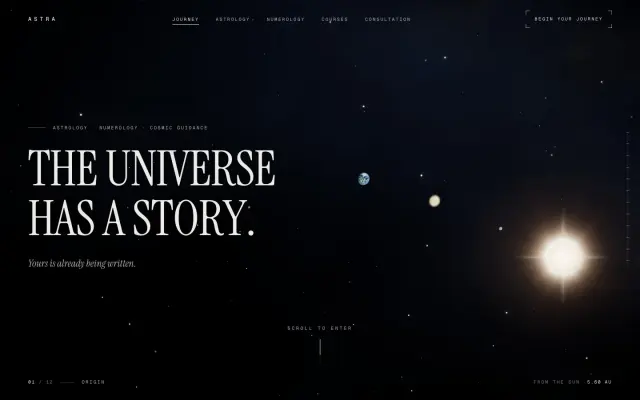
A scroll-driven story
BR-SOLAR
Next.js, React Three Fiber, GSAP, Lenis
One scroll is one camera flight, from the Sun past every planet. There is no image, video, model or texture file in it; the planets are shaders.
Prompt $5.99 · Prompt and source $18.99

A product page with no build step
LOGOFF 01
Plain HTML, CSS and JavaScript with three.js
One 3D sneaker turns to show each feature, comes apart into labelled parts and goes back together. Serve the folder and it runs.
Prompt $5.99 · Prompt and source $15.99

A device launch
NEON
Vite and React Three Fiber
One story clock drives the camera and every chapter, which is why it stays smooth where stacks of separate scroll triggers stutter.
Prompt $5.99 · Prompt and source $15.99

Your own 3D model
Vitrine
React and Three.js
A scroll-pinned turntable with an exploded view. The gadget is built in code, and you swap in your own .glb by changing one path.
Prompt $4.99 · Prompt and source $14.99
Best 3D website templates with source code →Single-file 3D scenes →Read the prompts from inside Claude Code, over MCP →
Five mistakes that cost the most time
- One prompt for everything. Stage it, and look at each stage.
- Adjectives in place of instructions. “Cinematic” means nothing to a renderer. Say where the light is.
- Text drawn inside the canvas. It cannot be selected, read aloud or indexed. Keep copy as HTML.
- Testing only on your own laptop. The phone is where 3D sites fail.
- Leaving performance to the end. Put the limits in the first brief; removing a thousand draw calls later is a rewrite.
Building a 3D website with Claude Code, answered
Can Claude Code build a 3D website?
+
Yes. Claude Code is Anthropic's coding agent: it reads your project, writes and edits files and runs commands. Three.js and React Three Fiber are ordinary JavaScript, so it can write a scene, the scroll animation and the page around it. What it cannot do is see the result the way you do, so the quality comes from a staged brief and from you checking each stage in the browser.
Do I need to know Three.js to build a 3D website with Claude Code?
+
No, but you need to be able to say what you want precisely: what the object is, how it is lit, where the camera starts and ends, and what happens on scroll. Knowing the vocabulary (mesh, material, draw call, pixel ratio) makes your instructions and your bug reports far better. The Three.js documentation is the reference for all of it.
Should I use Three.js or React Three Fiber?
+
Use React Three Fiber if the site is already React or Next.js: its documentation describes it as a React renderer for three.js, so the 3D shares state with the rest of the page. Use plain Three.js for a single page with no framework and no build step, which you can host anywhere.
What should a prompt for a 3D website include?
+
The stack and its versions, the scene (objects, materials, lighting), the camera path, what scroll does at each chapter, the page copy, the performance limits, and the fallbacks for reduced motion and for browsers without WebGL. Give it in stages, and end each stage with something you can check on screen.
How do I keep a 3D website fast?
+
Hold the page to Google's Core Web Vitals: Largest Contentful Paint within 2.5 seconds and Interaction to Next Paint of 200 milliseconds or less, at the 75th percentile of visits. In the scene, keep draw calls to a few hundred by instancing repeated objects, cap the pixel ratio on dense screens, and load the 3D after the first text has painted.
Will a 3D website built this way work on phones?
+
It will if you ask for it at the start. Have the agent lower the particle counts and effects on small screens, keep all text as real HTML over the canvas, respect the reduced-motion setting, and show a still image where WebGL is not available. Then test on a real phone, not only in a desktop browser's phone view.
Sources
- Anthropic, Claude Code documentation.
- Anthropic, Claude Code best practices.
- three.js, Three.js documentation.
- Poimandres, React Three Fiber: Introduction.
- Poimandres, React Three Fiber: Scaling performance.
- GSAP, ScrollTrigger documentation.
- web.dev, Google, Web Vitals.
- MDN, WebGL best practices.
- MDN, prefers-reduced-motion.