Runs on your own PC, day and night. Asks before it acts.
Overview
An assistant that keeps the business side of your day
A personal AI assistant that runs on your own computer around the clock, in English or Spanish. It reads your invoices and contracts, checks every sum and reminds you before each deadline; drafts a reply to each customer who writes to your WhatsApp Business number, for you to approve before anything is sent; watches your websites and their SEO in read-only mode; runs the routines you switch on; and tells you on your phone through Telegram when something needs you. One orchestrator sends each request — typed, spoken or from your phone — to the right department, every consequential action waits for your approval and is written to an audit log, and the AI model can run on your own machine through Ollama, so your documents never leave it. It restarts itself after a crash, starts when you sign in, backs itself up every night and shows a live progress bar for whatever it is doing. A setup wizard takes it from an unzipped folder to running, with your own country, time zone and currency; in Spain it adds legal research on official sources and VAT and income-tax estimates.
Built with
Python 3.12 · FastAPI · SQLite · Ollama for the AI on your own PC · server-rendered pages, no build step
To run it
Python 3.12 and Ollama. A PC that stays on; 16 GB of memory recommended (8 GB works with the smaller model).
Tested on
Windows 11. The macOS and Linux installers are included but not yet run on real machines.
Languages
English and Spanish, chosen per user; requests are understood in both.
Region
Your country, time zone and currency. Spain adds legal research, IVA/IRPF estimates and the Spanish invoice rules.
Costs to run
Nothing with the local model and Telegram. Meta charges for WhatsApp Business conversations; a cloud AI provider is optional.
Who hosts it
You do, on your own computer. We never run it, see your data or hold your keys.
What it does
Everything HARVIN does for you
Command centre
Ask in your own words; the right department answers
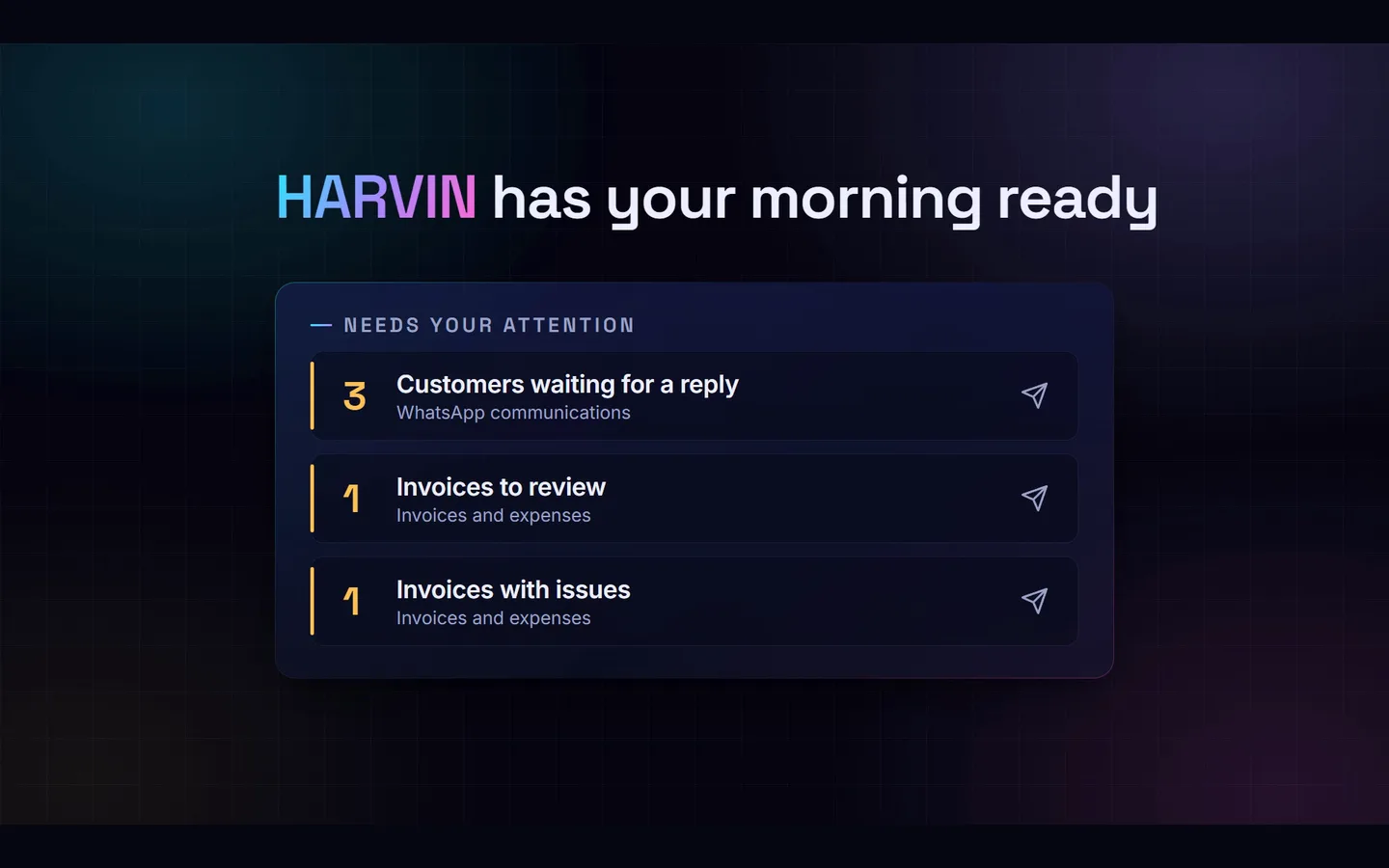
Type in the Command centre, click the microphone or switch on the wake word and say "Harvin, what do I have today?". An orchestrator classifies the request, picks the department — invoices, contracts, deadlines, customers, websites, automations, the system itself — checks your permissions and runs the typed tools behind it, while the agent graph lights up the path. The Today page puts what needs you first: customers waiting, invoices with problems, the next 14 days.
Deterministic tools answer the factual questions; the AI model writes the prose
Live progress bars and a running-tasks pill on every page
Light and dark themes, desktop and phone
Customers
Every WhatsApp customer gets a draft, and you approve it
With your WhatsApp Business number connected through Meta's official Cloud API, each customer message lands in the Customer inbox, stored encrypted. HARVIN classifies it, writes a short summary and drafts a reply from the business profile you give it. You edit it or approve it; nothing reaches a customer before you press Approve and send. Saved replies and a customer opt-out (STOP) are built in.
Official Cloud API only — no WhatsApp Web automation
The 24-hour customer-service window is shown on each conversation
Alerts for new customers can go to your phone
Documents
Invoices checked line by line, deadlines never missed
Upload an invoice, a contract or a receipt. HARVIN reads the supplier, the dates and the amounts, recomputes every line, the tax and the total in the invoice's own currency, spots duplicates, and turns due dates and notice periods into reminders. Each figure keeps where it came from, so a flag says exactly which line is wrong and why. Documents are encrypted on disk and searchable.
VAT, GST and sales-tax lines are read; numbers are read the way your country writes them
Overdue items are never hidden; deadlines export to your calendar (.ics)
"Mark as paid" is an approval, never a guess from the document
24/7
It keeps itself running and tells you when it can't
A supervisor restarts HARVIN after a crash, a watchdog catches a stuck one, and only one copy can run. It can start when you sign in, keeps the PC awake, backs itself up every night (integrity-checked, to an external disk if you like) and sends a morning summary to your phone. The System page shows what is fine and what needs you, with one-click backups and a test alert.
Telegram alerts with a one-time link, private chats only
Silent at night, every alert type switchable
Optional external uptime check (Healthchecks.io) for power cuts
How it works
How a request moves
The same path for a typed question, a voice command, a Telegram message or a scheduled routine. The gate is where it waits for you.
01UnderstandClassifies the request in English or Spanish and picks the department.Orchestrator
02PlanChooses typed tool calls, checks your role and permissions, and the sensitivity of the data.Department
◆Approveyou approveAnything consequential — a message to a customer, a website change, deleting a document, an automation — waits in Approvals.You
04ActRuns the tools, in the background when slow, with real progress where it can be measured.Worker
05RecordWrites every step to the audit log and answers on the channel you used.Audit log
Extend and customise
Make it yours
Every department is an extension with the same small contract, documented in docs/EXTENSION_GUIDE.md.
Add a department
Register a manifest, its tools and a page; the orchestrator, permissions, approvals and audit come with it.
harvin/extensions.py · docs/EXTENSION_GUIDE.md
Change the look
One stylesheet of design tokens: colours, glass, gradients, both themes.
harvin/web/static/style.css
Add a routine
One-click automation recipes and the scheduler that runs them, daylight-saving safe.
harvin/workflows/
Use a cloud model
Any OpenAI-compatible API alongside or instead of Ollama, allowed per data sensitivity.
Setup wizard → API keys
What's in the source
394 files — the finished project, ready to run with install_windows.bat (install.sh on macOS and Linux) and HARVIN.bat.
No asterisks. If something below would change your mind, it should change it now rather than after checkout.
What it is
A local-first assistant you install on your own computer — a Python web app that runs all day, with its database, documents, scheduler and (by default) its AI model on that machine.
Built for the paperwork and messages of a small business: invoices, contracts, deadlines, customer messages, websites and routine checks, in English or Spanish, with every consequential action waiting for your approval.
The complete source, with installers, the test suite and owner's manuals in both languages.
What you can do with it
Run free on your own PC with Ollama — the assistant, documents, invoices, deadlines, automations, the Command centre and the System page need no account anywhere.
Reach you on your phone through Telegram: alerts, the morning summary and a chat with HARVIN, text or voice notes.
Answer your customers through your WhatsApp Business number, once you connect Meta's Cloud API: a draft for each message, sent only when you approve it.
Watch your websites — availability, technical SEO, local and AI-search checks — and read Google Search Console and Analytics, in read-only mode.
Work in your country — dates, amounts, time zone and currency are yours. In Spain it adds legal research on official sources (BOE, AEAT) and VAT/IRPF estimates.
What it is not
Not a hosted or cloud service. It runs on your computer and listens only on that computer until you choose your office network. It is not meant to be put on the internet, and the computer has to stay on for reminders, backups and alerts.
Not legal or tax advice. Outside Spain there are no legal or tax pages at all, and invoices are checked only with rules that hold anywhere (sums, totals, dates, duplicates). In Spain the legal and tax modules cite official sources and give estimates; they never file, pay or sign anything, and say so.
Not WhatsApp without Meta. The customer inbox needs a Meta WhatsApp Business account, a phone number for it and a secure tunnel such as Cloudflare's; Meta bills each conversation. HARVIN never uses WhatsApp Web automation. This channel is implemented and tested against a simulation, and has not yet been run with a real Meta account.
Not verified on every system yet. Installed and tested on Windows 11. Telegram is tested against a simulation of Telegram's servers, not yet with a real bot on a real phone. The macOS and Linux installers, start at sign-in through a real reboot, Google and WordPress connections and scanned-document reading (it needs Tesseract) have not been run end to end. The owner's manual lists each one.
Not hands-off. It drafts and checks; you decide. Messages to customers, website changes, deleting documents and switching on automations all wait in Approvals, and it has no tools to pay, sign contracts or file taxes.
Not light on an old laptop. The local model wants 16 GB of memory to be quick (8 GB works with the smaller one, more slowly). On a weaker PC, an OpenAI-compatible cloud model works instead, billed to you by the provider.
Not resellable, and not a support contract. You can use and change the source for your own business. You can't resell or redistribute it. The pack is sold as it is: anything broken or missing we fix, but setup help beyond this guide and custom departments are separate studio work.
Setup guide
From zip to running all day
Five parts, in order. Parts 1 and 2 give you the whole assistant on your own computer, with nothing to pay for; Telegram, running 24/7 and WhatsApp are each one step further. Prefer not to do it by hand? Part 1 starts with letting Claude Code do the setup with you.
Part 1
Install it
About 20 minutes, most of it downloading
Python, the local AI and HARVIN itself. Windows is the tested path; macOS and Linux have their own installers in the pack.
Or let Claude Code do it with you
Open the unzipped folder in Claude Code and paste the request below. It reads SETUP_WITH_CLAUDE_CODE.md, checks the computer, installs what is missing, runs the installer and walks you through the wizard, asking before each step. Passwords and keys never go through the chat: you type them into HARVIN's own pages.
I have unzipped HARVIN in this folder. Read SETUP_WITH_CLAUDE_CODE.md and the installation guide, then install and set up HARVIN on this computer step by step. Speak to me in English. Ask me before installing anything or changing a system setting, and tell me whenever I need to do something myself.
Install Python 3.12
Exactly 3.12. On Windows, download it from python.org and tick Add python.exe to PATH in the installer. Check it worked:
py -3.12 --version
Install Ollama and a model
Ollama runs the AI on your own computer. Install it from ollama.com, then download the model that fits your memory: qwen2.5:7b (about 4.7 GB) with 16 GB or more, qwen2.5:3b (about 1.9 GB) with less. The setup wizard can download it for you too.
ollama pull qwen2.5:7b
Unzip HARVIN into a simple folder
For example C:\HARVIN: no special characters, and not inside a OneDrive or Dropbox folder.
Run the installer once
Windows: double-click install_windows.bat and wait for *Installation complete* (5–15 minutes). macOS: Install HARVIN.command. Linux: ./install.sh — it never uses sudo and prints the exact command for anything missing.
Start HARVIN
Windows: double-click HARVIN.bat (macOS HARVIN.command, Linux ./harvin.sh). Keep the window open; part 4 makes it start on its own. The first start creates its settings file with new secret keys and opens http://127.0.0.1:8000/setup in your browser.
Part 2
The setup wizard
About 10 minutes
Nine short screens in the browser. The first two only work on the computer HARVIN runs on.
Language and owner account
English or Spanish, then your name, a user name and a password of 12 characters or more. The owner is the only person who can approve important actions and change settings.
Region
Your country, time zone and currency, filled in from your browser the first time. Dates, amounts, automations, backups and alerts follow them. Spain also turns on the Spanish legal, tax and invoice rules; anywhere else those pages do not appear.
Artificial intelligence
HARVIN checks Ollama and recommends a model for your computer, with a download button and a real progress bar.
API keys — all optional
Telegram, WhatsApp Business, an OpenAI-compatible provider, Google Search Console and Analytics, WordPress. Each card says how to get the key and has Test the connection. Keys are kept only in .env on this computer.
Voice, documents, network, finish
Download a voice and speech recognition if you want to talk to it; documents are already encrypted; keep the network on This computer only unless you need the office network. Press Finish setup, then Restart now: HARVIN restarts by itself.
Part 3
Alerts on your phone
About 5 minutes
Telegram is free, needs no open port on your router, and is the simplest way to know HARVIN is working.
Create a bot
In Telegram, open @BotFather, send /newbot, choose a name and a user name ending in bot. It replies with a token.
Paste the token into HARVIN
Settings → API keys → Telegram: paste it, tick Enable Telegram, save and press Test the connection. Then restart HARVIN.
Link your phone
The Telegram page → Link a phone gives a one-time link, valid for 30 minutes. Open it on your phone and press Start.
Send yourself a test alert
On the System page press Send a test alert. From then on you get the alerts you choose and a morning summary at 08:30; if the summary does not arrive one day, HARVIN is not working.
Part 4
Leave it running 24/7
About 10 minutes
What HARVIN does for itself, and the few settings only you can change on the computer.
Start at sign-in
System page → Turn on start at sign-in, or from the HARVIN folder:
.venv\Scripts\python -m harvin.cli autostart on
Backups to an external disk
HARVIN backs up every night from 03:00 and keeps 14 days. Point it at an external disk or a NAS by adding one line to .env, restart, and press Back up now on the System page. Each backup holds the key to your documents: keep them private.
HARVIN_BACKUP_DIR=E:/HARVIN-backups
The computer itself
Sleep: *Never* when plugged in. Optionally automatic sign-in, *Restore on AC power loss → Power On* in the BIOS, and a small UPS. HARVIN keeps the PC awake while it runs and tells you after an unexpected stop once it is back.
Keep a copy of .env
It holds the key that unlocks your encrypted documents. Copy it to a USB stick kept somewhere safe.
Part 5
Customers on WhatsApp (optional)
About an hour, mostly in Meta's dashboard
The customer inbox works on Meta's official WhatsApp Business Cloud API. Full steps are in docs/en/WHATSAPP_GUIDE.md.
A Meta Business account and a number
Create the app in Meta's developer dashboard with the WhatsApp product, add a phone number that is not already on the WhatsApp app, and generate a permanent access token.
A secure tunnel
Meta has to reach HARVIN's webhook. A Cloudflare tunnel to HARVIN's separate ingress port does that without opening your router; HARVIN checks Meta's signature on every message.
Paste the credentials and write your business profile
Settings → API keys → WhatsApp, then the Customer inbox's settings: a few lines about your hours, prices and policies. HARVIN drafts replies only from what you write there.
Shortcut
Or let a coding agent do Part 1
Open the unzipped folder in Claude Code, Cursor, Antigravity or Windsurf and paste this. You still need Node.js installed, and the agent will not add keys or change code unless you ask.
I have unzipped HARVIN in this folder. Read SETUP_WITH_CLAUDE_CODE.md and the installation guide, then install and set up HARVIN on this computer step by step. Speak to me in English. Ask me before installing anything or changing a system setting, and tell me whenever I need to do something myself.
If something goes wrong
"Python 3.12 is required"+
Install exactly 3.12, not 3.13. On Windows, reinstall ticking "Add python.exe to PATH"; on macOS and Linux the installer prints the command.
The AI step says Ollama is not responding+
Start Ollama (open the app on Windows or macOS; ollama serve on Linux) and reload the page — or add an OpenAI-compatible key in the API keys step.
Answers are slow+
Choose the smaller model, qwen2.5:3b, in the AI step, or use a cloud provider. A first answer after a long pause is slower while the model loads.
Port 8000 is already in use+
Close the other program, or add HARVIN_PORT=8010 to .env and open http://127.0.0.1:8010.
No alerts on my phone+
On the Telegram page, check the phone is active and the alert type is ticked. If you sent /stop to the bot, /alerts turns them back on. Then press Send a test alert on the System page.
Scanned documents have no text+
Install Tesseract with your language pack, then Settings → Documents. Text PDFs, Word, Excel and text files need nothing extra.
I forgot the owner password+
Stop HARVIN, then in the HARVIN folder run .venv\Scripts\python -m harvin.cli reset-password YOUR_USERNAME. It asks for the new one twice and signs that user out everywhere.
macOS says the file is from an unidentified developer+
Right-click the file → Open → Open, or run xattr -dr com.apple.quarantine . in the HARVIN folder once.
Still stuck, or something in the pack is broken? Email support@brandmotion.in with what you ran and what it printed. Want it set up or customised for you? Talk to the studio.